My Sprite
A rocket drawn from a shape in the program flies across the screen. Open the shape block and draw your own in the grid. Teaches how a sprite's shape is written as a list of strings.
Open in Tokbit Level: Intermediate. Free in the browser, nothing to install, no account needed.
Run the example in Tokbit and step through it: before each step say what will happen and check it in the Variables panel. Then change it your way.
Flowchart
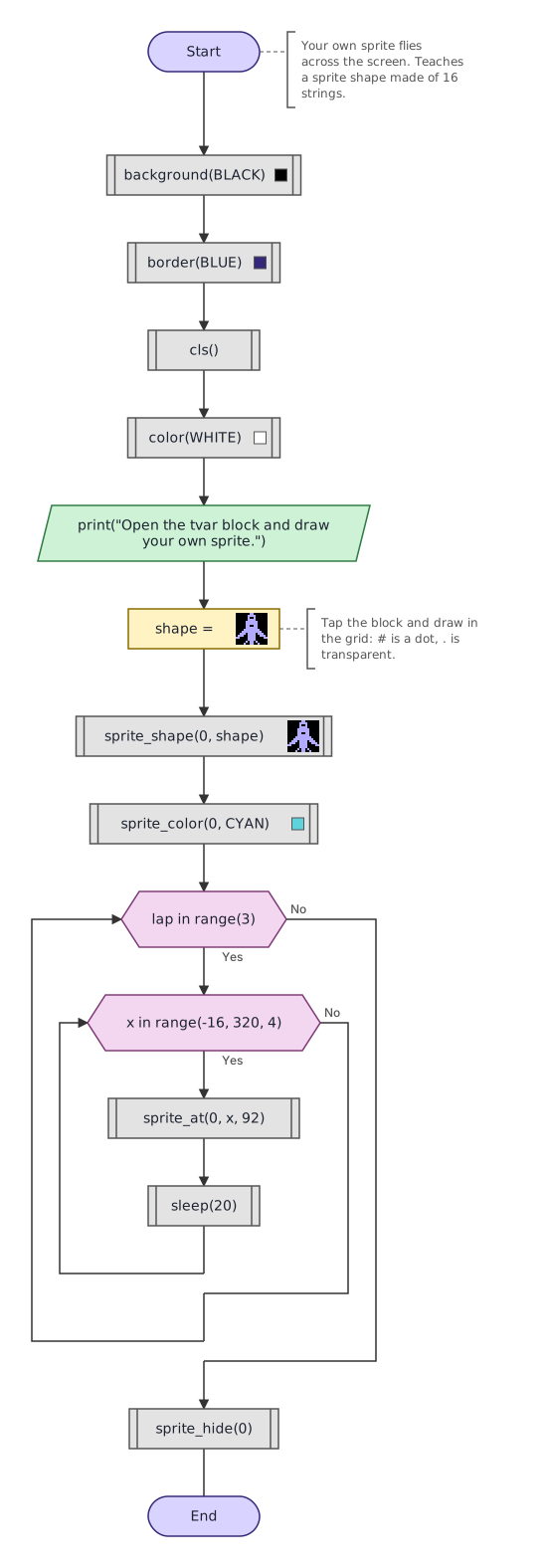
Python program
The same program as Python code. In Tokbit you see it when you switch from Diagram to Python above the flowchart.
"""Your own sprite flies across the screen. Teaches a sprite shape made of 16 strings."""
# Tokbit screen functions, not in plain Python:
from tokbit import (
    cls, color, background, border, sleep, sprite_at, sprite_color,
    sprite_hide, sprite_shape, BLACK, WHITE, CYAN, BLUE,
)

background(BLACK)
border(BLUE)
cls()
color(WHITE)
print("Open the tvar block and draw your own sprite.")
# Tap the block and draw in the grid: # is a dot, . is transparent.
shape: list[str] = [".......##.......", "......####......", "......#..#......", "......####......", ".....######.....", ".....######.....", ".....##..##.....", ".....######.....", "....########....", "...##########...", "..###.####.###..", ".###..####..###.", "##....####....##", "......####......", ".....#.##.#.....", "....#..##..#...."]
sprite_shape(0, shape)
sprite_color(0, CYAN)
for lap in range(3):
    for x in range(-16, 320, 4):
        sprite_at(0, x, 92)
        sleep(20)
sprite_hide(0)
Follow-up tasks
Tasks in which you change the example (with a model solution):