Circle
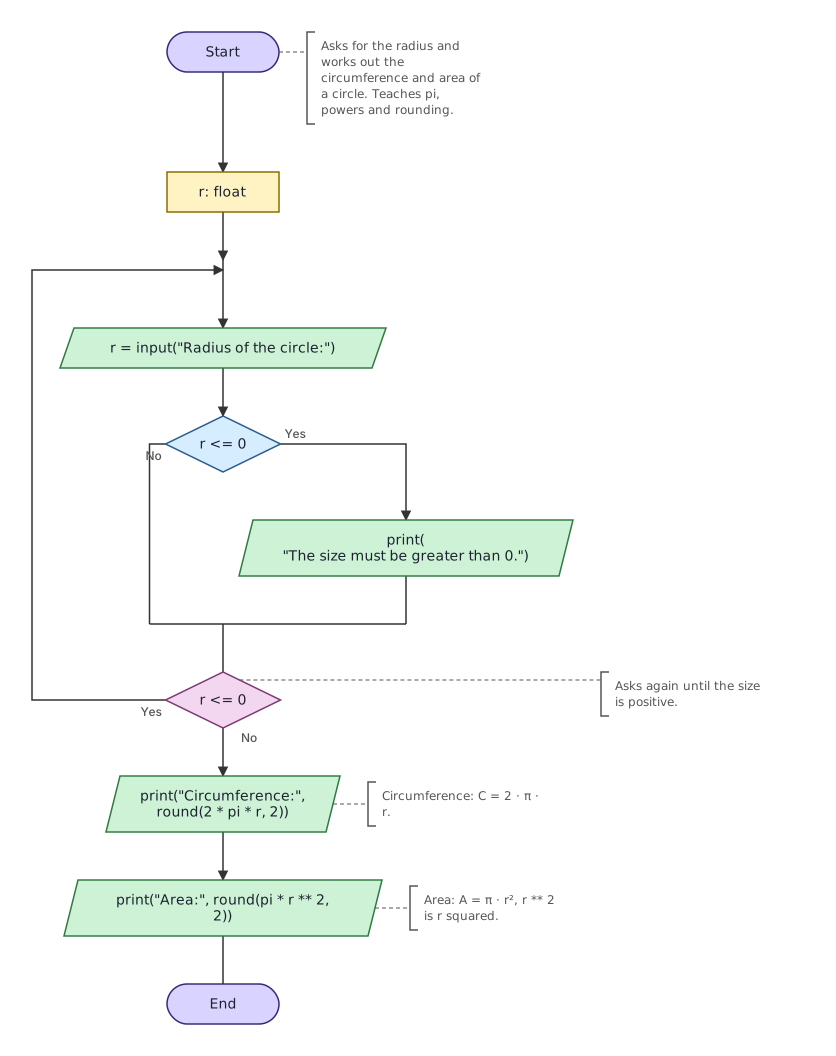
Asks for the radius and prints the circumference and area of a circle. Teaches pi, powers and rounding to 2 places.
Open in Tokbit Level: Beginner. Free in the browser, nothing to install, no account needed.
Run the example in Tokbit and step through it: before each step say what will happen and check it in the Variables panel. Then change it your way.
Flowchart
Python program
The same program as Python code. In Tokbit you see it when you switch from Diagram to Python above the flowchart.
"""Asks for the radius and works out the circumference and area of a circle. Teaches pi, powers and rounding."""
from math import pi

r: float
# Asks again until the size is positive.
while True:
    r = float(input("Radius of the circle:"))
    if r <= 0:
        print("The size must be greater than 0.")
    if not (r <= 0):
        break
# Circumference: C = 2 · π · r.
print("Circumference:", round(2 * pi * r, 2))
# Area: A = π · r², r ** 2 is r squared.
print("Area:", round(pi * r ** 2, 2))
Follow-up tasks
Tasks in which you change the example (with a model solution):