Arrows
A star moves around the screen with the arrow keys and stays inside the edges; space quits. Teaches arrow-key controls, writing at coordinates, pace and a game loop.
Open in Tokbit Level: Intermediate. Free in the browser, nothing to install, no account needed.
Run the example in Tokbit and step through it: before each step say what will happen and check it in the Variables panel. Then change it your way.
Flowchart
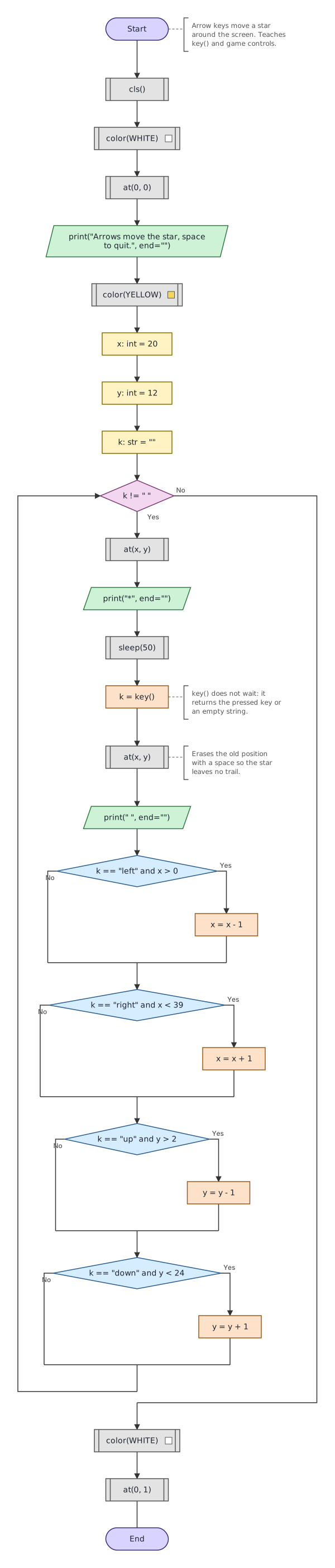
Python program
The same program as Python code. In Tokbit you see it when you switch from Diagram to Python above the flowchart.
"""Arrow keys move a star around the screen. Teaches key() and game controls."""
# Tokbit screen functions, not in plain Python:
from tokbit import cls, at, color, key, sleep, WHITE, YELLOW

cls()
color(WHITE)
at(0, 0)
print("Arrows move the star, space to quit.", end="")
color(YELLOW)
x: int = 20
y: int = 12
k: str = ""
while k != " ":
    at(x, y)
    print("*", end="")
    sleep(50)
    # key() does not wait: it returns the pressed key or an empty string.
    k = key()
    # Erases the old position with a space so the star leaves no trail.
    at(x, y)
    print(" ", end="")
    if k == "left" and x > 0:
        x = x - 1
    if k == "right" and x < 39:
        x = x + 1
    if k == "up" and y > 2:
        y = y - 1
    if k == "down" and y < 24:
        y = y + 1
color(WHITE)
at(0, 1)
Follow-up tasks
Tasks in which you change the example (with a model solution):